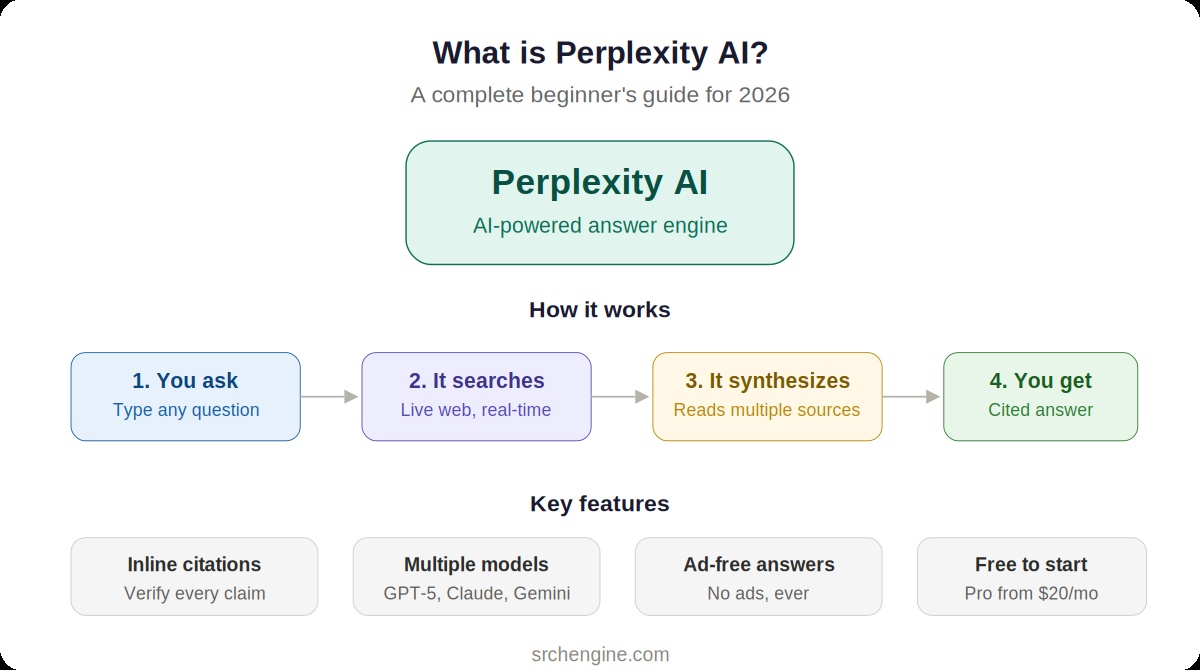
You’ve probably heard people talking about Perplexity AI. Maybe a coworker mentioned it. Maybe you saw it recommended on social media. Or maybe you just noticed that some people have stopped Googling things entirely and started “Perplexing” them instead.
If you’re wondering what all the fuss is about, you’re in the right place. This guide covers everything a beginner needs to know: what Perplexity actually does, how it works behind the scenes, what the free and paid plans include, and whether it’s worth adding to your daily workflow.
No jargon. No hype. Just a clear, practical walkthrough.
What Perplexity AI Actually Is
Perplexity AI is an answer engine. Not a chatbot. Not a traditional search engine. An answer engine.
When you type a question into Google, you get a list of links. You click through them, scan the pages, and piece together your own answer. When you ask ChatGPT, you get a conversational response drawn mostly from its training data, which may or may not be current.
Perplexity does something different. It searches the live web in real time, reads multiple sources simultaneously, and synthesizes everything into a clear, direct answer. Every claim includes numbered citations linking to the original sources so you can verify anything it tells you.
Think of it as a research assistant who reads the internet for you and hands you a summary with footnotes. You ask a question, and instead of getting ten blue links or an AI-generated guess, you get a sourced, structured answer in seconds.
How Does Perplexity Work?
Behind the scenes, Perplexity uses a technique called Retrieval-Augmented Generation (RAG). Here’s what that means in plain language:
Step 1: You ask a question. Type anything into Perplexity. It could be a simple factual query (“What’s the current Fed interest rate?”), a complex research question (“How do mRNA vaccines differ from traditional vaccines?”), or even a request with a file attached (“Summarize this PDF for me”).
Step 2: Perplexity searches the web. Unlike ChatGPT, which generates responses primarily from its training data, Perplexity searches live web sources for every query by default. It doesn’t wait for you to ask it to look things up. It just does it.
Step 3: It reads and synthesizes. Perplexity scans multiple sources, pulls out the relevant information, and combines it into a coherent answer. It’s not copying and pasting from one website. It’s reading several sources and creating an original synthesis.
Step 4: It cites everything. Every factual claim in the response gets a numbered citation. You can click any citation to go directly to the source page. This is Perplexity’s most distinctive feature, and the one that earns the most trust from users.
Step 5: You can ask follow-ups. The conversation continues naturally. Ask a follow-up question, and Perplexity remembers the context of what you were discussing. You can go deeper into a topic without starting over.
What Can You Use It For?
Perplexity works best for tasks where accuracy and sourcing matter. Here are the most common use cases:
Quick fact-checking. Need to verify a claim, check a statistic, or confirm whether something is true? Perplexity gives you the answer and shows you where it came from. No more opening five tabs and comparing conflicting information.
Research and learning. Whether you’re a student writing a paper, a professional preparing a presentation, or just someone curious about how something works, Perplexity turns complex topics into clear explanations backed by real sources.
Current events and news. Because Perplexity searches the live web, it always has access to the latest information. Ask about today’s stock market, yesterday’s election results, or a breaking news story, and you’ll get current answers with links to the reporting.
Product and service comparisons. “What’s the best project management tool for a small team?” or “Should I get a MacBook Air or MacBook Pro?” Perplexity pulls from reviews, comparison sites, and user discussions to give you a balanced perspective.
Professional research. Market analysis, competitive intelligence, industry trends, regulatory updates. Perplexity is increasingly popular with professionals who need reliable, sourced information quickly.
File analysis. Upload a PDF, document, or image, and ask Perplexity questions about it. It can summarize contracts, extract key points from research papers, or analyze data from uploaded files.
Free vs. Paid: What Do You Get?
Perplexity offers several tiers. Here’s what matters for most people:
Free Plan ($0)
The free plan is surprisingly capable. You get unlimited basic searches (called Quick Searches) that use Perplexity’s standard model. You also get a small number of Pro Searches per day (typically 3-5), which use more advanced AI models and dig deeper into sources.
The free plan is enough for casual use. If you search a few things a day and don’t need the most advanced models, you may never need to upgrade.
Best for: Casual users, people trying Perplexity for the first time, light research needs.
Perplexity Pro ($20/month or $200/year)
Pro is the plan most regular users choose. It unlocks unlimited Pro Searches, which means every query uses the most advanced AI models and retrieves more sources for better answers. You also get:
Access to multiple AI models including GPT-5, Claude, and Gemini, so you can choose which model answers your questions. File uploads with higher limits for analyzing documents, PDFs, and images. Research mode for multi-step, in-depth research reports with extensive citations. Image and video generation capabilities. Labs access for experimental features.
Pro makes sense if you use Perplexity daily for work or study. At $20/month, it’s the same price as ChatGPT Plus or Google’s Gemini Advanced, and for research-focused tasks, many users find it delivers more value.
Best for: Students, researchers, writers, analysts, professionals who search frequently.
Perplexity Max ($200/month)
Max is the power-user tier. It provides unlimited access to the latest AI models, early access to new features (including the recently launched Perplexity Computer agentic system and Comet browser), and priority support. At $200/month, it’s a significant investment.
Best for: Power users, professionals running complex multi-step research workflows, early adopters who want access to cutting-edge features.
Enterprise Plans ($40-$325/seat/month)
For teams and organizations that need admin controls, data security, collaboration tools, and audit logs. Enterprise Pro starts at $40/seat/month. Enterprise Max starts at $325/seat/month for organizations requiring the highest level of access and security.
Perplexity vs. Google vs. ChatGPT: The Quick Version
If you’ve read our full comparison (link to Article 1), you know the detailed breakdown. Here’s the short version:
Perplexity is best when you need a fast, sourced answer to a specific question. It’s the tool you reach for when accuracy and citations matter. Think of it as your research assistant.
ChatGPT is best when you need to create something. Writing, coding, brainstorming, image generation, extended analysis. Think of it as your creative collaborator.
Google is best when you need the full breadth of the internet. Product shopping, local business searches, Maps, YouTube, Scholar. Think of it as the everything engine.
Many people use all three. They start with Perplexity for research and fact-finding, move to ChatGPT for drafting and analysis, and keep Google for shopping, maps, and ecosystem tasks. The tools complement each other more than they compete.
Getting Started: Your First 10 Minutes with Perplexity
Ready to try it? Here’s a quick-start walkthrough:
1. Go to perplexity.ai or download the app (available on iOS, Android, Mac, and Windows). No account required to start searching, though creating a free account unlocks saved threads and history.
2. Ask your first question. Don’t overthink it. Type a question you’d normally Google. Something like “What are the health benefits of walking 10,000 steps a day?” or “How does compound interest work?”
3. Read the answer and check the citations. Notice the numbered references throughout the response. Click one or two to see where the information came from. This is Perplexity’s superpower: you can verify everything.
4. Ask a follow-up. Based on the answer you got, ask something deeper. “How does that compare to running?” or “What’s a good compound interest calculator for retirement planning?” Perplexity remembers your conversation context.
5. Try a Pro Search. If you have free Pro Searches available (check the toggle at the top), switch it on and ask a more complex question. Notice how Pro Search digs deeper, uses more sources, and provides a more thorough answer.
6. Upload a file. Got a PDF you need to understand quickly? Drag it into the chat and ask Perplexity to summarize it or answer questions about its contents.
7. Explore Collections. Save interesting threads into Collections (like folders) to build a personal knowledge base on topics you care about.
That’s it. No complicated setup. No learning curve beyond typing a question.
Tips for Getting Better Results
After using Perplexity daily for months, here are the habits that make the biggest difference:
Be specific. “Best restaurants” gives you generic results. “Best Indian restaurants in Roswell GA with outdoor seating” gives you exactly what you need. The more context you provide, the more targeted the answer.
Use follow-ups instead of new threads. Perplexity maintains context within a conversation. If your first question was about retirement planning, your follow-up about Roth IRAs will be more relevant because Perplexity remembers the context.
Toggle Pro Search for important queries. Save your Pro Searches (especially on the free plan) for questions where depth matters. Quick factual lookups work fine with standard search.
Ask Perplexity to compare things. It excels at structured comparisons. “Compare Notion vs. Obsidian for personal knowledge management” produces a well-organized, sourced comparison you can actually use for decision-making.
Verify before you trust. Even with citations, AI can occasionally get things wrong. For high-stakes decisions (financial, medical, legal), click through to the source and confirm the information yourself. Perplexity makes this easy by linking every claim.
Is Perplexity Worth It?
For the free plan, absolutely. There’s no cost and no commitment. If you search for information online more than a few times a week, Perplexity will save you time and give you better answers than scrolling through search results.
For Perplexity Pro at $20/month, it depends on how much you research. If you’re a student, writer, analyst, or anyone whose work involves finding and synthesizing information regularly, Pro pays for itself quickly in time saved. If you only search casually a few times a week, the free plan is probably enough.
For Max at $200/month, you need to be a serious power user or early adopter to justify the price. Most people will be very well served by Pro.
The bigger question isn’t whether Perplexity is worth trying. It’s whether you’re still spending 20 minutes hunting through Google results for something Perplexity could answer in 20 seconds. For most people, the answer is yes, and that’s the habit worth changing.
What’s Next for Perplexity?
Perplexity is evolving fast. In early 2026, they launched Perplexity Computer, an agentic AI system that can take a goal, break it into steps, and execute complex workflows across multiple AI models. They also released the Comet browser, which integrates AI assistance directly into web browsing.
Perhaps most notably, Perplexity walked away from advertising entirely in early 2026. While ChatGPT started testing ads and Google continues to deepen ad integration into AI results, Perplexity committed to a subscription-only model. Their reasoning: users need to trust that the answers aren’t influenced by advertisers. That’s a meaningful differentiator in a world where ad-supported AI answers are becoming the norm.
Whether these moves pay off commercially remains to be seen. But for users, the direction is clear: Perplexity is doubling down on being the most trustworthy, research-grade AI search tool available.
New to AI search? Start with our comparison of the top three tools: [Perplexity vs. ChatGPT vs. Google: Which AI Search Tool Should You Use in 2026?]